Multi-State Preview
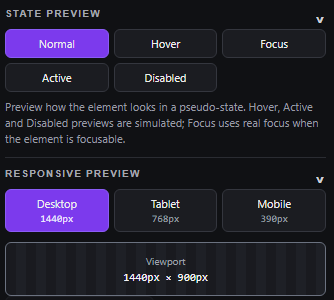
Preview Normal, Hover, Focus, Active, and Disabled states on the selected target.
Where a pseudo-state cannot be forced natively, MFI simulates it and labels it clearly as simulated in the panel UI.Modern Frontend Inspector is a precision developer tool that sits between the rendered interface and your code. Local-first by design: inspect, modify, and export production styles directly on live pages — with no accounts, no tracking, and no telemetry.
Frontend developers and designers spend hours switching between DevTools, component files, and terminal rebuilds just to test a typographic or layout adjustment.
CSS.supports validation.MFI connects observation, mutation, and implementation into a single seamless loop.
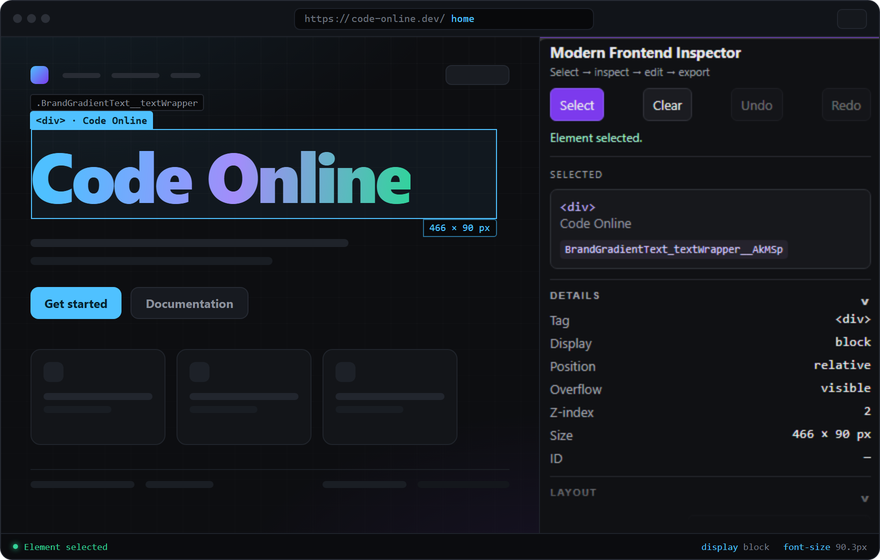
Point and click any element on the page. A high-contrast overlay locks the target and distinguishes hovered elements.
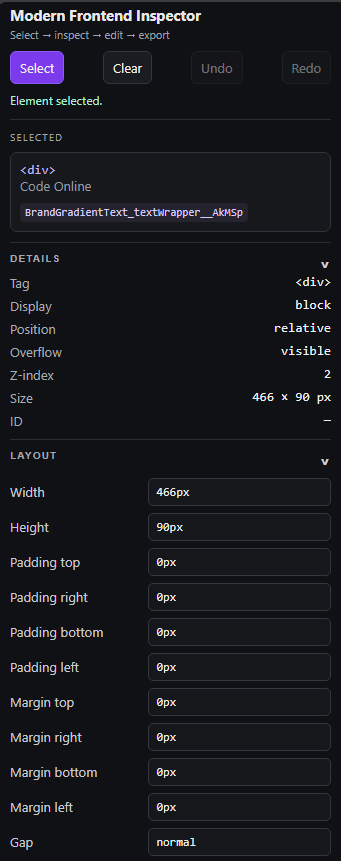
Read true computed styles, examine box model dimensions, trace var() references, and inspect pseudo-elements.
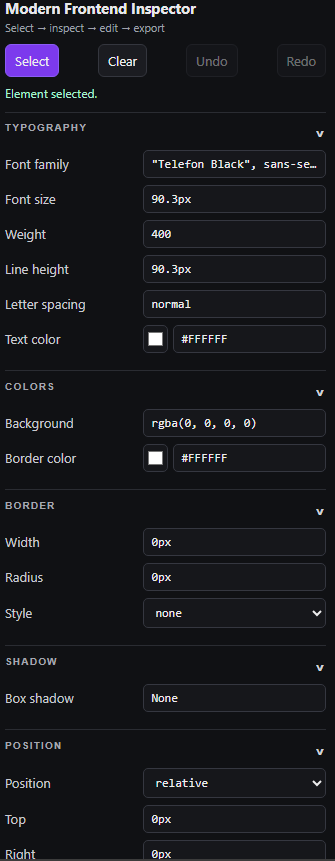
Adjust spacing, typography, colors, borders, and positioning. Every value is validated before application.
See adjustments live with a ~140 ms debounce across interaction states and responsive viewport widths.
Iterate without fear. Step backward and forward through a complete session history, or reset properties individually.
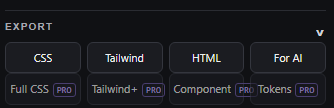
Turn visual decisions into clean CSS, theme-aware Tailwind classes, HTML snippets, or AI-handoff contexts.
Toggle CSS values below to see how MFI inspects the target, mutates properties live, and generates production-ready exports.
.cta-button {
padding: 12px 24px;
border-radius: 8px;
background-color: #4fc1ff;
color: #062330;
font-weight: 600;
transition: transform 0.15s ease;
}
MFI exposes actual computed values from the browser rendering engine, bypassing guesswork and cascading style ambiguities.
Read exact pixel dimensions, resolved color values, calculated line heights, and inheritance paths.
Trace var(--name) tokens back to their parent declaration rules without manually searching stylesheets.
Inspect and inspect properties declared on ::before and ::after pseudo-elements.
React, Vue, and Svelte component re-renders are tracked automatically to preserve selection lock.
Tweak typography, layout geometry, colors, borders, and positions in real time. Changes are debounced at ~140 ms and validated before they touch the DOM.
Invalid syntax or unsupported property values are caught immediately in the input field before application.
Comprehensive controls covering Layout, Typography, Colors, Borders, Box Shadows, and Positioning.
Restore any single attribute to its original computed value with one click without discarding your other tweaks.
Test hover states, emulate responsive viewport widths, and navigate your complete chronological edit history.
Preview Normal, Hover, Focus, Active, and Disabled states on the selected target.
Where a pseudo-state cannot be forced natively, MFI simulates it and labels it clearly as simulated in the panel UI.Emulate Desktop 1440px, Tablet 768px, and Mobile 390px directly within the side panel.
Emulation uses the Chrome Debugger API; when unavailable, MFI falls back to constrained-width emulation and notes it.Every style change lands in an immutable history stack. Step forward and backward safely at any moment.
Changes list highlights modified properties for immediate review and auditing.Each browser tab maintains an independent inspection session. Edits in one tab never bleed into other open pages.
Closing the tab discards session styles completely, keeping browser memory clean.Once your styles look right in the browser, export them directly in the format your codebase expects.
Exports your modifications as concise, valid CSS property blocks ready to paste into stylesheet rules.
Maps spacing, typography, and color values into standard Tailwind CSS utility classes.
Copies the exact clean markup structure of the selected element and its immediate subtree.
Generates structured element summaries formatted specifically for pasting into AI coding assistants.
The complete inspection and editing core remains 100% free with unlimited usage. Pro adds specialized leverage tools for high-volume implementation workflows.
Theme-aware Tailwind mapping that resolves arbitrary values against standard and custom config presets.
Exports the complete, exhaustive computed style tree of an element, rather than solely your session modifications.
Analyzes page DOM signals to discover and cycle between elements sharing similar classes, structures, or styles.
Apply synchronized CSS modifications across multiple selected elements simultaneously in one pass.
Lifts a rendered element subtree along with its associated styles into a clean, reusable component template.
Aggregates unique colors, spacing metrics, and typographic choices from selected elements into structured token palettes.
| Capability | Free Plan | Pro License |
|---|---|---|
| Core Inspection & Mutation Engine | ||
| Element selection (hover & lock overlay) | ||
| Computed CSS, variable tracing, ::before/::after | ||
| 28 editable properties with live preview (~140 ms) | ||
| Undo/redo history, per-property reset | ||
| State preview (Normal / Hover / Focus / Active / Disabled) | ||
| Responsive emulation presets (1440 / 768 / 390) | ||
| Basic export: CSS, basic Tailwind, HTML, AI-handoff | ||
| Daily usage or inspection quota | None (Unlimited) | None (Unlimited) |
| Pro Workflow Leverage Features | ||
| Advanced Tailwind Export | ||
| Full Computed CSS Export | ||
| Similar Element Discovery | ||
| Multi-element Editing | ||
| Component Extraction | ||
| Design Token Extraction | ||
Inspected page content stays in your browser and is not sent to the MFI licensing service. Full details in the Privacy Policy.
Purchase → license key → activate in the extension. No account, no password.
$0
The full core: inspect, edit, preview, undo/redo, export. Unlimited use, no daily quota.
Add to Chrome$5.99 / month
All Pro workflow features. Cancel any time from the billing portal.
Buy Pro Monthly$49.99 / year
All Pro workflow features. Save about 30% versus monthly.
Buy Pro Annual$59.99 one-time
Pay once, keep all Pro features. No subscription, no renewal.
Buy Pro LifetimeSecure checkout via Lemon Squeezy (Merchant of Record). Taxes are handled at checkout. See our Terms & Refund Policy.
No. Everything you inspect — DOM, HTML, CSS, computed styles — is processed locally in your browser and is not sent to the MFI licensing service. MFI ships no analytics and no telemetry at all. The only network requests the extension makes are to the licensing service for entitlement activation, validation and lifecycle, which involve none of your page data. See the Privacy Policy for details.
No. MFI never asks you to create an account or set a password. The Free plan needs nothing at all. If you buy Pro, you receive a license key and activate it inside the extension — that is the whole flow.
Removing the license returns that installation to the Free plan. The licensing service currently enforces one active activation per license. If an earlier activation is still counted, contact support before moving the license to another device.
Free is the complete core experience: element selection, real computed CSS inspection with variable tracing and pseudo-elements, 28 editable properties with live preview, undo/redo with per-property reset, state preview, responsive emulation, and export to CSS, basic Tailwind, HTML and AI-handoff — with no daily quota. Pro adds the workflow features on top: Advanced Tailwind Export, Full Computed CSS Export, Similar Element Discovery, Multi-element Editing, Component Extraction and Design Token Extraction.
MFI is a Chrome extension built on Manifest V3 and uses the Chrome side panel API, so it supports Chrome versions that provide side panel support. Other Chromium browsers that implement the same APIs may work, but Chrome is the supported target.
Purchases are processed by Lemon Squeezy (Merchant of Record). We offer a 14-day refund for licenses that have not been activated — see the Terms & Refund Policy or contact us via the Support page.
Shorten the gap between visual discovery and production code. Zero accounts, zero tracking, complete local-first control.